

EPFO Launches PF Withdrawal on UPI-Based System: Everything You Need to Know
The Employees’ Provident Fund Organisation (EPFO) has taken a major step towards digital convenience by introducing a UPI-based withdrawal system for provident fund claims. This groundbreaking feature allows employees to withdraw their PF money instantly using UPI, eliminating the long waiting periods that were common with traditional methods – PF withdrawal UPI.
Let’s understand what this new system is, how it works, and how you can benefit from it.
What is EPFO’s UPI-Based PF Withdrawal System?
EPFO’s new UPI-based withdrawal system is a digital payment mechanism that enables instant transfer of PF amounts directly to your bank account using the Unified Payments Interface (UPI).
In simple terms: Instead of waiting days or weeks for your PF claim to be processed and transferred via NEFT/RTGS, you can now receive your money instantly through UPI—just like you transfer money to friends using apps like Google Pay or PhonePe.
Key Features:
- Instant transfers – Money credited within minutes
- No bank details required – Just your UPI ID
- 24/7 availability – Withdraw anytime, even on holidays
- Secure and encrypted – Bank-grade security
- Paperless process – Completely digital
- Real-time confirmation – Immediate notification of success
Why This is a Game-Changer
Before UPI System:
Traditional PF withdrawal process:
- Submit withdrawal claim online or offline
- Wait for employer verification (2-7 days)
- EPFO processes the claim (5-15 days)
- Amount transferred via NEFT (1-2 days)
- Total time: 7-20 days or more
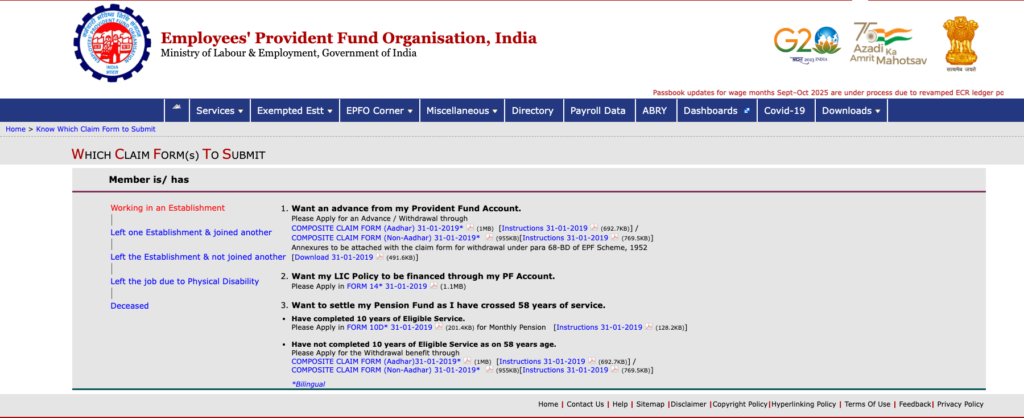
After UPI System:
New UPI-based process:
- Submit withdrawal claim with UPI option
- Employer verification (if required)
- EPFO approves
- Money transferred instantly via UPI
- Total time: Minutes to a few hours
The difference is revolutionary—especially during emergencies when you need funds quickly.
How Does the UPI-Based PF Withdrawal Work?
The Technology Behind It
EPFO has integrated with NPCI’s UPI platform, the same system that powers Google Pay, PhonePe, Paytm, and other payment apps. When you request a withdrawal:
- EPFO generates a payment request
- The request is sent through the UPI network
- Your bank receives the instruction
- Money is instantly debited from EPFO’s account and credited to yours
- You receive a notification confirming the transfer
No intermediate banking delays, no cheque clearing, no NEFT wait times.
Step-by-Step Guide: How to Withdraw PF Using UPI
Prerequisites:
Before you start, make sure you have:
- Active UPI ID linked to your bank account
- Aadhaar linked to your PF account
- UAN (Universal Account Number) activated
- Bank account seeded with UAN
- Mobile number registered with EPFO
Step 1: Access EPFO Portal
- Visit the official EPFO website: www.epfindia.gov.in
- Go to the “Services” section
- Click on “For Employees”
- Select “Member UAN/Online Services”
Step 2: Login to Your Account
- Enter your UAN (Universal Account Number)
- Enter your password
- Enter the captcha code
- Click “Sign In”
First-time users: You’ll need to activate your UAN first
Step 3: Submit Withdrawal Claim
- Click on “Online Services” in the menu
- Select “Claim (Form-31, 19, 10C & 10D)”
- Verify your bank account details
- Click “Proceed for Online Claim”
Step 4: Select Claim Type
Choose the appropriate claim form:
- Form 19 – For final PF settlement (when leaving job permanently)
- Form 31 – For partial withdrawal (specific purposes like medical, education, housing)
- Form 10C – For pension withdrawal (if applicable)
Step 5: Choose UPI as Payment Method
- After filling claim details, you’ll see payment options
- Select “UPI” as the payment mode
- Enter your UPI ID (e.g., yourname@paytm, yourphone@ybl)
- Verify the UPI ID carefully
Step 6: Submit and Verify
- Review all details
- Click “Submit”
- You’ll receive an OTP on your registered mobile
- Enter the OTP to authenticate
- Submit the claim
Step 7: Track and Receive
- Your claim will be processed by EPFO
- Once approved, money is instantly transferred to your UPI ID
- You’ll receive a payment notification from your UPI app
- Check your bank account balance
Typical processing time: A few hours to 1-2 days for approval, then instant transfer
Who Can Use UPI-Based PF Withdrawal?
Eligible Members:
✅ All EPFO members with active UAN ✅ Aadhaar-linked PF accounts ✅ KYC-verified members ✅ Valid UPI ID holders ✅ Both current and former employees
Special Cases:
- International workers: Can use if they have Indian bank account with UPI
- Pensioners: May have limited access (check EPFO guidelines)
- Joint accounts: Primary account holder’s UPI ID should be used
Benefits of UPI-Based PF Withdrawal
1. Lightning-Fast Transfers
No more waiting weeks for your hard-earned money. Get it within minutes once approved.
2. No Bank Account Details Needed
Just your UPI ID—which is easier to remember and type than lengthy account numbers and IFSC codes.
3. Lower Transaction Failures
UPI has a higher success rate than traditional NEFT/RTGS transfers.
4. 24/7 Availability
Unlike NEFT/RTGS which have cut-off times, UPI works round the clock.
5. Real-Time Updates
Instant notifications via SMS and app alerts when money is credited.
6. Enhanced Security
Multi-factor authentication and encrypted transactions protect your money.
7. Environmentally Friendly
Completely paperless—no cheques, no physical forms needed.
8. Convenience
Withdraw from anywhere using just your phone.
Common Withdrawal Scenarios
Scenario 1: Job Change (Non-Settlement)
If you’re switching jobs and don’t want to withdraw:
- No action needed – Your PF transfers to new employer automatically
- UPI withdrawal not applicable
Scenario 2: Unemployment Period
After leaving a job and unemployed for 1-2 months:
- You can withdraw partial amount using Form 31
- Use UPI for instant credit
- Useful for meeting expenses during job search
Scenario 3: Final Settlement
Leaving the workforce permanently or after extended unemployment:
- File Form 19 for complete PF withdrawal
- Choose UPI option for fastest payment
- Get entire accumulated PF + interest
Scenario 4: Emergency Needs
For medical, education, or housing expenses:
- Use Form 31 for partial withdrawal
- UPI ensures quick access to funds during emergencies
- Subject to eligibility conditions
Important Things to Know
UPI Transaction Limits
Standard UPI limits may apply:
- Most banks: ₹1,00,000 per transaction
- Some banks: Up to ₹2,00,000 per transaction
- Premium accounts: Higher limits possible
For larger PF amounts: If your withdrawal exceeds UPI limit, EPFO may split it into multiple transactions or offer alternative payment methods.
Tax Implications
PF withdrawals are taxable if:
- Withdrawn before 5 years of continuous service
- TDS (Tax Deducted at Source) will be deducted by EPFO
- TDS Rate: 10% (with PAN) or 30% (without PAN)
Tax-free withdrawals:
- After 5 years of continuous service
- Unemployment for 2+ months
- Medical emergencies (partial withdrawal)
Payment method (UPI or NEFT) doesn’t affect tax treatment
Common Issues and Solutions
Issue 1: UPI ID Not Accepting
- Solution: Ensure UPI ID format is correct (e.g., name@bankname)
- Verify it’s active by testing a small transaction first
Issue 2: Transaction Failed
- Solution: Check bank UPI transaction limit
- Ensure sufficient balance in EPFO account
- Retry after some time
**Issue 3: Money Not Received
- Solution: Check spam/junk in UPI app
- Wait 24 hours before raising grievance
- Contact EPFO helpline: 1800-118-005
Issue 4: Aadhaar Not Linked
- Solution: Link Aadhaar first via EPFO portal
- Process takes 2-3 days for activation
Safety and Security Tips
Protect Your PF Account:
- Never share OTPs with anyone
- Use only official EPFO website (epfindia.gov.in)
- Verify UPI ID carefully before submitting
- Keep UAN credentials confidential
- Enable SMS alerts for all transactions
- Check claim status regularly on EPFO portal
- Beware of phishing – EPFO never asks for passwords via email/SMS
Verify Before You Withdraw:
- Confirm your bank account is linked correctly
- Ensure UPI ID is active and operational
- Check eligibility criteria for your claim type
- Review tax implications if withdrawing early
EPFO’s Digital Transformation Journey
The UPI-based withdrawal system is part of EPFO’s larger digitalization initiative:
Recent Innovations:
- UMANG app integration – PF services on mobile
- Aadhaar-based authentication – Paperless KYC
- AI-powered claim processing – Faster approvals
- Higher pension – Implementation of Supreme Court ruling
- Auto-settlement – For small inactive accounts
Future Enhancements Expected:
- Integration with more payment platforms
- Instant grievance redressal via chatbot
- Enhanced mobile app features
- Blockchain for transparent tracking
- AI-driven claim verification
How This Benefits Employees
Financial Flexibility
Access to your own money when you need it most—without the stress of long waiting periods.
Emergency Preparedness
Medical emergencies, sudden expenses, or job loss—quick access to PF funds provides a safety net.
Better Financial Planning
Knowing you can access funds quickly helps in better budgeting and planning.
Reduced Dependency
No need to rely on loans or credit cards during transitions between jobs.
Peace of Mind
The convenience of instant transfers removes anxiety about payment delays – PF withdrawal UPI.
Frequently Asked Questions
Q: Is there any extra charge for UPI-based withdrawal? A: No, EPFO doesn’t charge any fee. Regular UPI transactions are also free.
Q: Can I change my UPI ID after submitting claim? A: No, once submitted you cannot change it. Submit a fresh claim if needed.
Q: What if my PF amount is more than UPI limit? A: EPFO may split into multiple UPI transactions or offer NEFT option.
Q: How long does approval take? A: Typically 1-3 days for simple claims, up to 20 days for complex ones.
Q: Can I track my claim status? A: Yes, login to EPFO portal and check under “Track Claim Status.”
Q: Is Aadhaar mandatory? A: Yes, for UPI-based and most modern PF services, Aadhaar linking is mandatory.
The Bottom Line
EPFO’s UPI-based PF withdrawal system is a major upgrade that brings your provident fund into the digital age. It offers:
✅ Speed – Instant transfers instead of weeks of waiting ✅ Convenience – Withdraw using just your UPI ID ✅ Reliability – Higher success rates and 24/7 availability ✅ Security – Bank-grade encryption and authentication
Who benefits most:
- Employees changing jobs frequently
- People facing financial emergencies
- Anyone who values quick access to their own money
- Digital-savvy workers who prefer online transactions
Getting Started:
- Link your Aadhaar to UAN
- Activate your UPI ID
- Keep your UAN and password handy
- Submit your claim when needed
The days of waiting anxiously for PF claims to clear are over. With UPI integration, EPFO has made accessing your hard-earned savings as easy as sending money to a friend.
Take advantage of this system and enjoy hassle-free PF withdrawals!
Also read our article Finance portal and on –Scapia vs Niyo Credit Card (2025): Features, Rewards, Fees & Best Choice
#EPFO #ProvidentFund #PensionBenefits #SalaryImpact #RetirementPlanning #IndiaFinance #LabourReforms