


Apple Pay vs Google Pay: Which Mobile Payment App Should You Choose?
Mobile payments have changed the game—no more fumbling for cash or cards, just a quick tap of your phone. Leading the pack are Apple Pay and Google Pay, delivering fast, secure, contactless payments. But which one’s the best fit for you? In this easy guide, we’ll compare Apple Pay and Google Pay—focusing on how they work, how they safeguard your card info, and what makes them different. Let’s jump in!
What Are Apple Pay and Google Pay?
Apple Pay: Apple’s Seamless Payment Solution
Launched in 2014, Apple Pay is Apple’s mobile payment system built into iPhones, iPads, Apple Watches, and Macs. It’s designed for quick, secure payments using your device—no physical card required.
Google Pay: Google’s Flexible Payment Hub
Google Pay, rebranded from Android Pay in 2018, is Google’s mobile payment platform. It works on Android phones, Wear OS watches, and even iPhones (with limits), offering a versatile way to pay and more.
Both use Near Field Communication (NFC) for contactless payments—tap your phone at a checkout, and you’re good to go. But their approaches vary. Let’s break it down.
How They Work: Step-by-Step
Apple Pay: Simple and Device-Driven
- Setup: Open the Wallet app on your iPhone or iPad, tap “Add Card,” and scan or enter your credit/debit card details. Verify with your bank (via text or app), and it’s set.
- In-Store Payment: Unlock your iPhone with Face ID, Touch ID, or a passcode, then hold it near an NFC reader—within 1-2 seconds, a vibration and checkmark confirm it’s done. On Apple Watch, double-click the side button, select your card, and tap.
- Online/App Payment: Pick Apple Pay at checkout, authenticate with biometrics or a passcode, and you’re finished—no card number typing needed.
Google Pay: App-Centric and Streamlined
- Setup: Download the Google Pay app (Android or iOS), add your card by scanning or entering details, and verify with your bank. On Android, it syncs with your Google account.
- In-Store Payment: Unlock your Android phone (no app needed if it’s your default wallet), tap it on an NFC reader, and look for a blue checkmark—done in under 2 seconds. On Wear OS, open Google Pay, choose your card, and tap.
- Online/App Payment: Select Google Pay at checkout, confirm with a PIN or biometric scan, and it’s processed instantly.
Card Security: How They Protect Your Sensitive Info
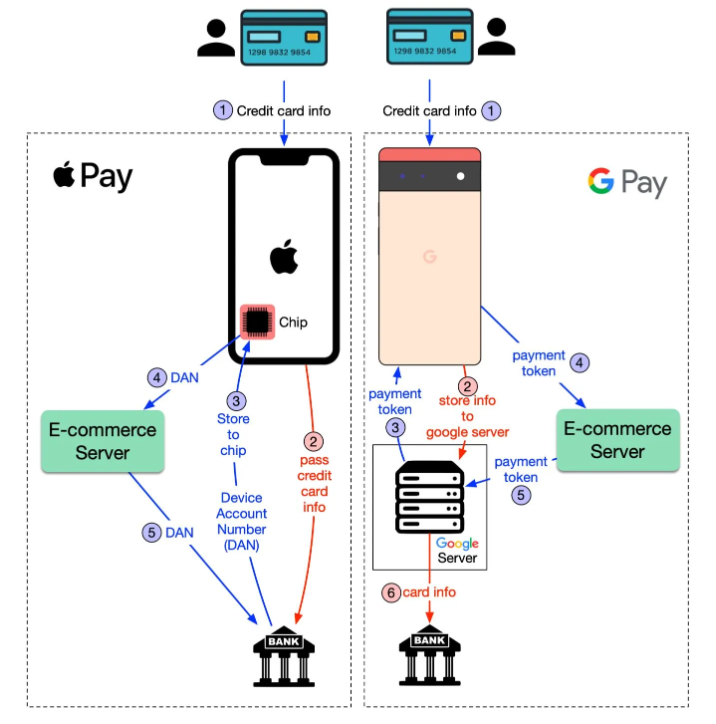
Both Apple Pay and Google Pay keep your card details safe, but their methods differ in how they handle sensitive information. Let’s break it into two key processes: card registration and payment flow.
Apple Pay: Privacy-First with Device Account Number (DAN)
- Registration Flow: When you add a card, Apple doesn’t store your card info. Instead, it sends the details to your bank, which generates a unique Device Account Number (DAN)—a tokenized code. This DAN is stored in a secure hardware chip called the Secure Element on your device, not on Apple’s servers.
- Payment Flow: When you tap “Pay,” your device sends the DAN to the merchant’s server, which forwards it to the bank for approval. Your real card number never travels over the public network after registration—it’s only encrypted once during setup.
- Why It’s Secure: With the DAN locked in the Secure Element and no transaction data stored by Apple, your privacy stays intact. A 2023 Statista report found 92% of users trust this tokenized approach over physical cards.
Google Pay: Tokenized via Google Servers
- Registration Flow: Add a card to Google Pay, and the card info is securely stored on Google’s servers. Google then sends a payment token—a unique, encrypted stand-in for your card—back to your phone.
- Payment Flow: When you hit “Pay,” the merchant’s server sends this payment token to Google’s servers. Google looks up your real card info there and passes it to the bank for approval. Your card details stay off the public network during transactions, though they’re encrypted when sent to Google initially.
- Why It’s Secure: The payment token ensures merchants never see your card number, and Google encrypts all data. Still, some anonymized transaction info (like store name) may be collected to improve services.
Security Trade-Offs
- Apple Pay: Limits card info exposure to just one encrypted trip (to the bank during setup), but requires banks to support DAN—a complex process.
- Google Pay: Keeps card info on its servers, adding a step in the payment flow, but simplifies bank integration. Both are rock-solid, though Apple’s approach leans harder into privacy.
Key Differences: Apple Pay vs Google Pay
1. Device Compatibility
- Apple Pay: Only for Apple devices—iPhones (6+), Apple Watches, iPads, and Macs.
- Google Pay: Works on Android (5.0+ with NFC), Wear OS, and iPhones (online payments only, no in-store taps)—more flexible across platforms.
2. Extra Features
- Apple Pay: Offers Apple Cash (U.S. only) for sending money via iMessage—clean and payment-focused.
- Google Pay: Adds peer-to-peer payments (U.S. and India), plus storage for loyalty cards and tickets—a broader digital wallet.
3. Availability
- Apple Pay: 80+ countries, strong in the U.S. and Europe.
- Google Pay: 40+ countries, expanding quickly in Asia.
Pros and Cons: Side-by-Side
Apple Pay
- Pros: Ultra-private with DAN, seamless for Apple users, no server-stored card info.
- Cons: Apple-only, fewer extras.
Google Pay
- Pros: Cross-device support, versatile features, secure tokenization.
- Cons: Card info on Google servers, less privacy-focused.
Which One’s Right for You?
- Choose Apple Pay if: You’re an Apple user who prioritizes privacy and simplicity. The DAN and Secure Element combo is perfect for a locked-down experience.
- Choose Google Pay if: You want flexibility across Android or iOS and don’t mind Google handling your card info securely for added features.
In the U.S., Apple Pay leads with 54% of mobile payment users, while Google Pay holds 43% globally (Business Insider, 2024). Your device and privacy stance might decide!
Final Thoughts: Apple Pay or Google Pay?
Apple Pay and Google Pay both offer secure, tap-to-pay convenience with smart card protection—Apple via its DAN and Secure Element, Google through server-based tokens. Apple Pay excels for Apple fans who value privacy above all, while Google Pay shines for its versatility and broader reach. Either way, you’re stepping into a safe, wallet-free future in 2025.
Which suits you? Let your phone and priorities guide the choice!
Read more🌐 about latest Tech updates on out Technology Category Section
#ApplePay #GooglePay #MobilePayments #DigitalWallet #ContactlessPayments #TechTrends #PaymentApps #CyberSecurity #Tech2025 #FinTech