
Understanding SSL Certificates in 5 Minutes (Simple Guide for Non-Techies)
Ever Wondered What That Little Padlock in Your Browser Really Does? If you’ve ever clicked on a website and instantly felt safe because you saw a tiny padlock in the address bar…
Congrats—you’ve already met SSL (SSL Certificate explained).
But what exactly is it? And why does every website (yes, even the small ones) absolutely need it today?
Let’s break SSL down—BuzzWriter style—so you understand everything in 5 minutes or less. ⏱️
What Is an SSL Certificate? (Imagine a Digital Passport)
Think of an SSL certificate like a digital passport for your website.
It proves two things:
1️⃣ Your website is really yours—not an imposter.
2️⃣ Any data sent to and from your site is encrypted, meaning hackers can’t read it.
The moment someone visits your site, SSL kicks in and creates a secure, encrypted tunnel between your visitor’s browser and your server.
That’s why URLs with SSL start with HTTPS instead of plain old HTTP.
The “S”?
It literally stands for Secure.
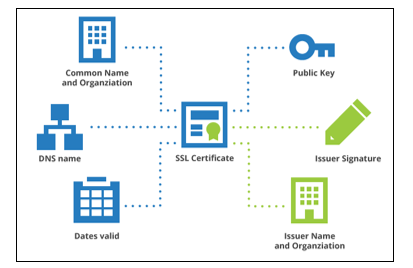
How SSL Works (In Plain English)
Here’s the 5-second version:
- A visitor opens your site.
- Their browser asks your server for a secure connection.
- Your server shares its SSL certificate.
- The browser checks if it’s legit.
- If everything matches, both sides create encrypted keys and boom—secure connection established.
It’s basically a secret handshake, but for the internet. 🤝
🛡️ Why SSL Is a Must-Have — Even If You Don’t Handle Payments
Here’s what SSL does for every website:
✔ Protects user data
Even things like contact forms and login pages become safer.
✔ Boosts Google rankings
Google LOVES secure sites.
HTTPS is literally a ranking factor.
✔ Builds trust instantly
Users see the padlock → They feel safe → They stay longer.
✔ Opens the door for online payments
No SSL? No checkout. Period.
💡 Types of SSL Certificates (Quick Cheat Sheet)
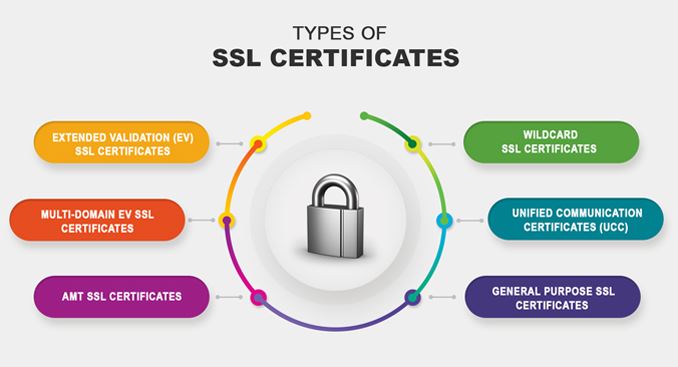
There are three main flavors:
1️⃣ DV — Domain Validated
Fast, simple, cheapest.
Great for blogs, portfolios, and small sites.
2️⃣ OV — Organization Validated
Business-level verification.
Adds more trust.
3️⃣ EV — Extended Validation
The “VIP” version.
Used by banks, fintech, and enterprise sites.
Most small businesses and creators only need DV or OV.
⚡ SSL vs TLS — Are They Different?
Technically yes—TLS is the upgraded version.
But in everyday conversation?
Everyone still calls it SSL.
So when someone says “SSL,” they usually mean TLS/SSL encryption in general.
🚀 How to Get an SSL Certificate Today
You have two super easy options:
⭐ 1. Free SSL (Let’s Encrypt)
Most hosting providers offer this with one click.
⭐ 2. Paid SSL (More features + support)
Great for businesses that need OV or EV certificates.
Your hosting provider can install SSL for you—usually in minutes.
🎉 Final Takeaway: SSL Isn’t Optional… It’s Expected
In today’s digital world, SSL isn’t a luxury.
It’s the bare minimum for credibility, rankings, and security.
If your site isn’t running on HTTPS yet, make it your next 5-minute task.
Your visitors—and Google—will thank you. SSL Certificate explained
Use the Code BYTESTACK360 to get additional 10% discount on your purchase from Hostinger.
Read more🌐 about latest Tech updates on out Technology and Learning labs Category Section
Also read our previous article on Perplexity AI Unleashes Claude Opus 4.5 for Max Subscribers
#SSL #CyberSecurity #WebHosting #TechTips #WebsiteSecurity
SSL certificate, HTTPS, website security, encryption, SSL vs TLS, cybersecurity basics